FAQs
About Us...
We are based in Devon, in between the rolling hills of Newton Abbot, Totnes & Torquay, ideally situated next to the New South Devon Link Road making for the best transport links in and out of South Devon.
Our new online design module is software that allows you the customer to design directly here on our website. Depending on the product you have chosen the software will allow you to choose a pre-defined template and adjust or make changes as you see fit or the software also allows you to create a new bespoke unique design from scratch. The facility to upload your own images and store them on our servers. You will be able to select elements such as fonts from a pre-defined list.
This software not only will streamline the design process it will allow you the customer to cut out the middle man designer. The software natively outputs a PDF file ready for use when printing with us.
All designs created by you will automatically be saved for later use when returning.
We help your business by offering an efficient print portal with competitive pricing. This teamed up with the online design module streamlines the processes involved in purchasing print. Our level of customer service and turnaround times means you are always ahead of the competition in support and service.
Printing & Colours
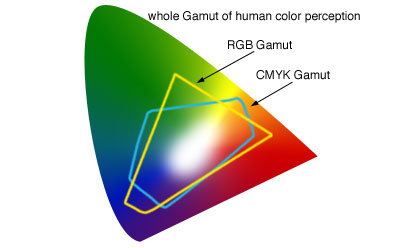 It is very important to remember that we print in CMYK and not RGB but we do recommend that you leave your images in sRGB format and let us do the conversion to CMYK as it provides a better result with our new CANON printers.
Adobe lightroom will use the sRGB format as standard and there is no need to change unless you are not getting the desired results. If you need or want to convert to CMYK you will need software such as Adobe Photoshop.
There are colours in the RGB spectrum that cannot be reached in CMYK, and if your files are left as RGB our printers convert them automatically, and do a pretty good jub, you just need to undersatnd these are different colour spaces so there may be a slight change.
 Using Adobe Lightroom:
Ok, light room does not deal with CMYK images only RGB, so if you are using this software you really need to make sure that you format your images in the sRGB profile. Whatever you do DO NOT choose to format your images in the PROPHOTO profile - this profile is NOT suited to commercial printing and will provide undesirable results.
 Using Adobe Photoshop: (NO LONGER REQUIRED - BUT HERE IS HOW IF YOU WANT TO)
 Make sure your colour settings are correct, to setup your colour settings go to the EDIT menu in photoshop and choose the option > Colour Settings.
In this menu you have the choice of presets, your best choice for UK commercial printing is to choose EUROPE PREPRESS 3 - this will adjust your ICC profile to the coated Fogra39 profile for CMYK images which is what we use when printing.
- Once you have set up this you can then start to open your images and then convert to the CMYK format.
- To convert your images, use the Image Menu header and choose > Mode > CMYK. By selecting this your image will then be converted to the correct colour space for printing.
- It is at this point you should then adjust your colours and or balance/saturation and what you see on screen should then resemble what gets printed.
- Also, make sure you have the correct resolution for printing, this is 300dpi for optimal printing.
Save your images as JPEGs in this format and then use them in your online designs. Jpeg format help keeps the file size down for creating your calendars online. You cannot upload a TIFF file when designing online so saving in this format is the best way to go.
DIGITAL PRINTING - What you need to know...
 We are a digital printer and use the latest technology CANON printers. These are 'toner base printers' which is then 'fused' to the paper.
The colour is made up of 4 colours (Cyan, Magenta, Yellow and Black) toners which are applied on top of the paper then get a hot roller process to 'fuse' the toners to the paper. This results in a more vibrant print - some people may say this is oversaturated, however, it is not, it is simply because there is no 'dry-back' to the paper like you would get with traditional wet ink printing method. Because there is no dry-back with digital print, your prints stay lush and vibrant.
As a recommendation we always say if colour is important to you then get a printed proof - this can save a lot of money in the long run if you are conscious of how your artwork/images are going to be printed and the colour output.
 CMYK vs RGB - Just what exactly can happen?
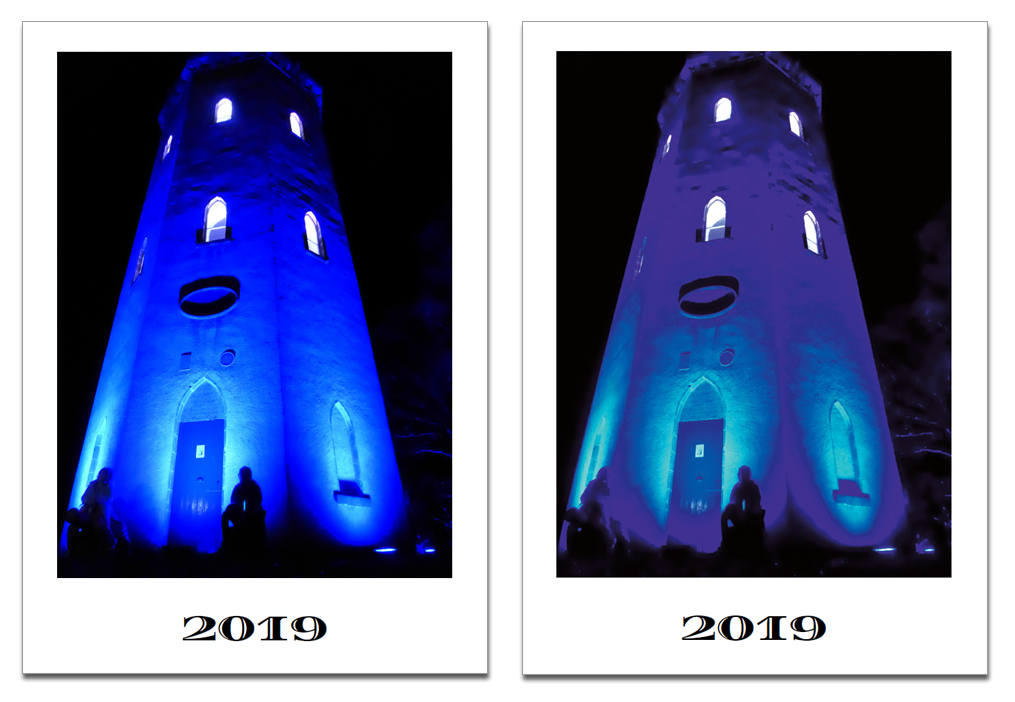
OK, so now you know that your images will print differently based on what format and colour space you use, it would be worth showing you how this affects your images.
Shown here is an image formatted in sRGB which is lovely and vibrant, and then the same image shown converted to CMYK. You will see the image has lost some of its colours when converted to CMYK - this is because the CMYK spectrum of colour cannot match the same spectrum that RGB can reach.
So, we say that after conversion to CMYK format, then tweak your colours to suit your needs. By converting to CMYK you will get a more accurate print to screen result.
If you leave your images in RGB and then we print them, the printer automatically converts the images during the process to CMYK, based on what's going in it tries to replicate this as best as possible - the result of this is a more vibrant and perhaps oversaturated image than you were expecting as the file should really be CMYK and not RGB.
As a recommendation we always say if colour is important to you then get a printed proof - this can save a lot of money in the long run if you are conscious of how your calendar is going to be printed and the colour output.
 But My Screen Shows My Images How I Like Them...
Yes, of course it does...its YOUR screen, you are used to this, and you accept this as being CORRECT - but as equipment is all different, as well as lighting and ambient environments who is to say your screen is 100% colour accurate over the screen in your conservatory room, or the HD screen on your friends tablet or phone in their garage - which one is right? The image here shows just how different things can look, which one is correct.......Neither - the printed proof is correct.
This is a massive topic and we cannot go into it -but quite frankly you cannot rely on what you see on your moniotrs to be 100% correct. We calibrate our monitors here to match what we see on screen to what comes out from the printer.
We can do this as we have a start point (screen) and an end point (print) but we cannot convey that to you with an email proof. You must get a printed proof to show the final output in all cases if colour is important to you.
So the Final Outcome?
We mention it quite a bit here, if you are in anyway conscious of colour or expect a specific output based on what you see then you really should be ordering a printed proof. We offer different levels of proofing, here they are explained in full:
1 - No Proof - I Accept The Printed Result:
This option is without any proofing, you assume full responsibility for your printing, Your job will get printed as is and there isn't much we can do if there is something wrong with your details or information. So colour accuracy is not covered, spelling, grammar etc - however, what is covered in the layout, if there is a printing glitch such as an image is missing off your calendar, but it's in your design studio, or there is a print defect then, of course, we rectify these issues.
2 - Email Proof
For this option, we send your file again to you after your order is placed. This file will be a low-resolution PDF file optimised to be sent by email. There will be a loss in quality for this proof and cannot be used for quality or colour accuracy - this email proof will be purely content only and is a good way of double-checking everything is ok with your file one last time before it goes to print - You CANNOT use an email proof as a colour accurate proof.
3 - Unbound Printed Proof
This means we will print your file out and proof physically. Here you will see the actual output for colour accuracy and final quality. If there is anything wrong at this stage we can then look to rectify any issues. Perhaps the colour isn't right or the quality of the images is too poor - we can then work together to rectify any issues to get the right output so everyone is happy.
4 - Full Bound Printed Proof
The same as above, but here we fully finish your proof into a final item, so any calendar binding and punching will be included showing the final product exactly as it's going to be produced.
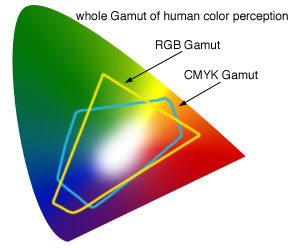 All printing here is printed in CMYK. We do not print in RGB.
Any files that you use in your designs or any artwork submitted to us in RGB colour spaces will be automatically converted to the CMYK colour space for effective printing.
RGB colours are for screen application only and there are colours in the RGB spectrum that CMYK cannot reach - this is why your designs in RGB can appear slightly different when printed - this si to be expected.
Our online design module is setup to work in sRGB as standard and we convert to CMYK as the file is being printed, this seems to give the best result.
Resolution refers to the quality of the file you are going to print. we always recommend your files to be at 300dpi of their intended print size.
All professional software will output a PDF file at this high quality resolution however if the images you are using in your documents ARE NOT set at 300dpi before you put them in then they will not magically then become 300dpi when you output your files...
Certain software will not output your files as high res 300dpi, for instance Microsoft Power Point is a screen only application and not recommended to be used as a print application.
If you are in any doubt contact us here for advice, or send us a file so that we can check the quality of the file you are looking to print. If you have any hesitation in the quality you want to print, then we always recommed selecting a printed proof where available to ensure you are happy with the final outcome.
We print with both Offset (traditional lithographic) printing and Digital printing. We term ourself as a 'digital printer' as our Offset machinery has Direct Imaging technology. This means we image directly to the printing presses negating the need for the traditional plate making methods and the chemical processes associated with these traditional methods. The majority of our print however is achieved using the latest Digital Presses from CANON UK.
This makes us very environmentally friendly with a very low carbon footprint. Our offset press also runs without a water feed (most offset printing presses have a direct constant water feed) and with vegetable-based toners is one of the most ecological printing presses on the planet.
Our digital print equipment is the latest Canon graphic production units, we run multiples of these machines that can handle short to high run print on demand providing near offset printing quality. By running multiple machines we guarantee a 99% uptime which means we do not let our customers down.

Products
There is no limit to the amount of items you can order with us, however there is a limit to how many of each item you can order.
On all of our products the minimum and maximum quantity is listed. The reason for this is due to our printing methods and sheet sizes we only list our competitive volumes.
There are up to three options for supplying or designing and customising a product. On every product page you are presented with these available options:
1. Custom Design: lets you create a bespoke design from scratch. Click it to open the design studio and use multiple tools to create your own design from a blank starting point
2. Upload Design: using this option, you can upload your own JPG, JPEG, GIF, PNG, EPS, AI, PDF and PSD images - use this option when supplying already designed - Print Ready Artwork (Also called Camera Ready)
3. Browse Design: If the product has pre-defined templates available for use, then select this option to choose from our pre-loaded templates. Work on them or customise them through our design studio.
The type of paper used for difference purposes is expressed in weight. In the countries following the European system, it is grammes per square metre (gsm or g/m2 or simply g) and in the US system it is Pound (lb).
The paper used for writing/printing (letterheads and such stationery) is generally between 60 to 120 gsm (20 to 70 lb) and is called the paper or text stock. Anything heavier than this is considered the card stock, i.e. the paper used for business cards, postcards, greeting cards, etc.
We offer three main paper types in varying weights..
The first of this type is Gloss paper - a triple coated paper with a high sheen - the whitest paper point making it ideal for colour reproduction and vibrancy. This paper as it is triple coated with a gloss finish, provides a refraction of light and shows a highlight.
The second being Silk Paper - a coated paper that is slightly off-white - ideal for business documents or where the resulting finish is desired to be flat and smooth. Under a microscope silk paper has 'ridges' that soak up the light and therefore no refraction occurs.
The third being Matt Paper or often referred to as Uncoated or Bond - This finish of paper has no coating at all, has a high white starting point. As the paper is not coated, offset printing (wet ink) can dry back into the paper making the print appear duller. Digital printing uses toner and is fused on top of the paper, so although the colors are still vibrant the white areas of the print have no coating. This paper is used as standard for items such as letterheads and compliment slips.
All of our paper is sourced and purchased from FSC accredited suppliers.
Delivery
 We use the DPD next day delivery network to fulfill all of our deliveries. We have found these to offer the best all round service, not only including looking after your parcels during transit but also offering the best tracking method available
Every order has delivery tracking where you are given the name of the driver, shown his current route and you are given your delivery time to within the hour!!
Pricing
All prices on this website are plus VAT at the current chargable rate unless the product is VAT exempt. To get a final VAT price for any item, simply add your items to the shopping cart - here you will see the final price you will be paying for your items. Any delivery charges will also be shown at the shopping cart and checkout stage.
Our dynamic price calculation system allows you to configure each product and see the pre-VAT price right on the product page before adding to the shopping cart or checkout stages.


